for Mac
for iPad


News shouldn't be like email. Pulp takes your favorite news feeds and presents them in a beautifully friendly & familiar format, making it easy to quickly scan through headlines, previews, and photos to find the stories that interest you most. It's like your very own personalized newspaper, designed for your Mac & iPad.
See What's New
The latest articles are automatically highlighted, letting you see what's new and how long ago they were posted.
Read Later
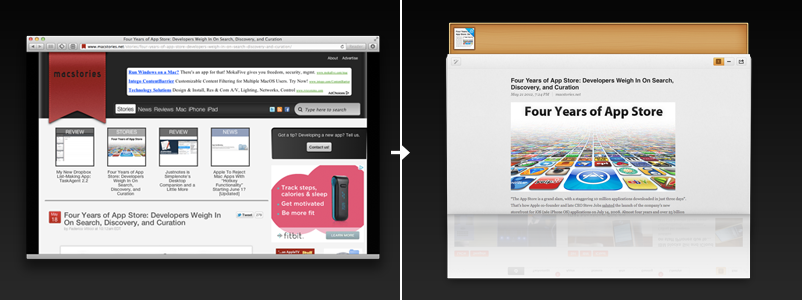
Save interesting articles to the shelf, the perfect place to queue up stories that you want to check out later. You can even save articles found in your browser.
Customize
Click the Edit button at any time to add, remove, or re-arrange your feeds and pages.
Welcome to Pulp. Mouse over a feature to learn more.
See What's New
The latest articles are automatically highlighted, letting you see what's new and how long ago they were posted.
Read Later
Save interesting articles to the shelf, the perfect place to queue up stories that you want to check out later. You can even save articles found in your browser.
Customize
Tap the Edit button at any time to add, remove, or re-arrange your feeds and pages.
Welcome to Pulp. Mouse over a feature to learn more.
Pulp is unlike any other newsreader you've seen. By showing you multiple feeds with stories that include large photos and inline text previews all on one page, Pulp makes it easy to find the articles you're actually interested in reading.
Coffee breaks aren't endless, so Pulp makes it easy to save articles you want to read later. Drag interesting stories to the shelf, the perfect place to quickly store articles you don't have time to read. Come back at any time to check them out in more detail.
Dealing with RSS and URLs can be a pain. Pulp includes Google-powered feed search built-in, so you can instantly find your favorite news sites and blogs, or discover new ones, simply by typing in their name - then add them to Pulp with one click.
When you want to sit down and read an article, Pulp elegantly curls down the main page, letting you focus on the story in a clean and consistent format. If you want to see more than what's available in just the feed, flick on Pulp's amazing Magic Reader feature to stream in the full article from the web.
Magic Reader
One click magically grabs the entire article from the web, stripping out any excess elements to let you focus on reading.
Easy Share
Easily share an article through Facebook, Twitter, or email.
Article View. Mouse over a feature to learn more.
Magic Reader
One tap magically grabs the entire article from the web, stripping out any excess elements to let you focus on reading.
Easy Share
Easily share an article through Facebook, Twitter, or email.
Article View. Mouse over a feature to learn more.
Tired of feeds that only publish short text previews? Introducing Magic Reader: with the tap of a button, you'll instantly see the full story formatted into a clean and easy-to-read format, regardless of where it's from. Magic? You could say that.
You won't discover every interesting story exclusively in Pulp, but now you can read them all there. Get the official Save to Pulp browser extension for Safari or Google Chrome, and Pulp will save a cleanly formatted version of any web article right to your shelf.
Pulp's new smart home page makes it easier than ever before to see the most interesting stories at a glance. When you don't have time to flip through hundreds of articles, take a quick look at the latest trending topics and stories all in one place.
Home Page
The home page tab shows you the latest trends in your feeds.
Trending Topics
Trends are highlighted using the most important keywords in each article, and colored according to their relevancy.
Home Page. Mouse over a feature to learn more.
Home Page
The home page tab shows you the latest trends in your feeds.
Trending Topics
Trends are highlighted using the most important keywords in each article, and colored according to their relevancy.
Home Page. Mouse over a feature to learn more.
Pulp's smart analyzation engine sorts articles from your feeds into general topics and trends, and automatically determines which trends are most relevant based on a wide range of criteria, including when a story broke and how many feeds are mentioning it.
Home page is designed to make it as easy as possible to see everything important from your feeds in one place. An elegant and thoughtful layout implicitly ranks the best new trends while also encouraging exploration of other interesting news items.
Like the front page of the best news site in the world, Pulp's home page is always up-to-date and relevant to your interests. Come back to visit at any time to see the latest hot news stories as they break from all of your pages and feeds.
Sometimes you're catching up with the latest news at work on your Mac, sometimes you're sitting comfortably on a sofa with your iPad. Wouldn't it be great if you always had the same information in front of you, regardless of where you were?
We think so too. Pulp is now seamlessly integrated with iCloud, meaning all of the pages, feeds, read articles, and other settings on all of your Macs and iPads are automatically kept in sync over the air. Every change you make is pushed instantly to your other devices, so you can always pick up right where you left off. It just works.
Pulp includes a whole slew of additional helpful features and traits that you'd expect from an innovative, quality newsreader. Here are a few of our favorites:
Import your favorite feeds from Google Reader or OPML.
Edit pages, layout, feed styles, font sizes, and more.
Pulp is optimized for the retina display on the new iPad.
One click blocks out all the ugly distractions of a desktop environment.
Pulp only badges articles from the last 15 minutes, so you're never overwhelmed.
Thoughtfully hand-crafted by a small independent studio in Canada.
Download Pulp today on the Mac App Store and the App Store for iOS: